Design with AI: 6 ways we use AI to support better creative work
Adobe reports that 86% of creators now use generative AI. Here at TBH Creative, AI has quickly become part of our creative process, too.
We’ve been exploring where it can genuinely support better creative work. We use it to brainstorm ideas, solve practical design problems, create fast prototypes, expand what’s possible with existing assets, and get to stronger creative solutions more efficiently.
Design with AI has become another tool within our creative process. Our designers still set the direction, make the decisions, and determine whether the final result is right for the client, audience, and brand.
Here are seven ways we’re putting that approach into practice.
Brainstorm and build on ideas
Creative work requires a steady stream of new ideas, and sometimes you get stuck. One of the simplest ways we use AI in the design process is as a brainstorming partner.
We can bounce an idea off AI much like we would another person on the creative team. We might ask it to brainstorm different approaches to a challenge, suggest visual themes, poke holes in an idea, or help us think about the project from another audience’s point of view.
This concept isn’t unique to design. In The AI-Driven Leader, Geoff Woods encourages leaders to use AI as a thought partner while keeping themselves firmly in the role of thought leader. That’s a good way to describe our approach to brainstorming, too.
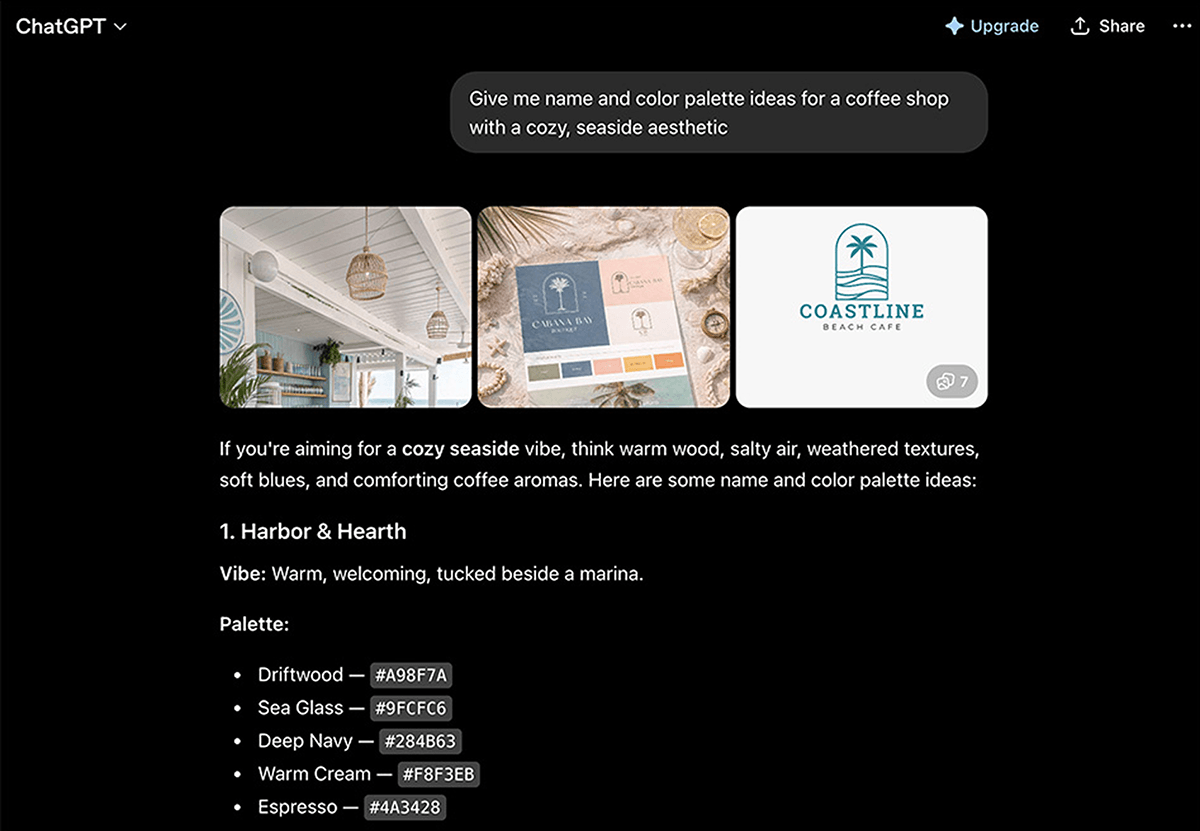
Sometimes AI’s suggestions aren’t useful at all. Sometimes they confirm we’re already headed in the right direction. And every once in a while, AI suggests something that makes us think, “No, but what if we tried something inspired by this variation instead”
That’s where we find it most valuable. It can help us get unstuck, look at a problem differently, or find a stronger direction faster.
Remove distractions and improve existing photography
Not every useful application of AI involves creating something new. Sometimes we already have a strong photograph, but something about it gets in the way of the design.
Maybe there’s a distracting person in the background. A car is parked in an unfortunate spot. A sign pulls attention away from the subject. An object interferes with where copy needs to go.
AI-powered tools such as Generative Fill in Adobe Photoshop can make these kinds of edits considerably faster. We’ve also changed basic demographics such as age or ethnicity to best fit the audience targeting.
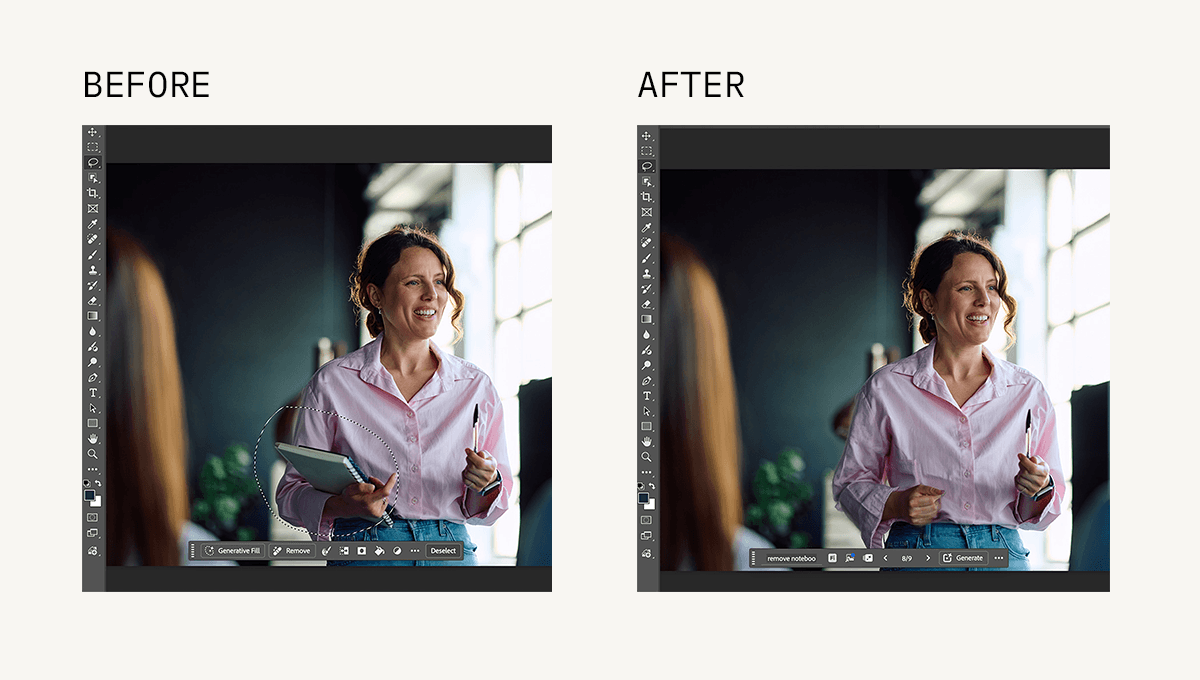
Instead of painstakingly rebuilding a complicated background by hand, we can identify the area that needs to change and use AI to generate a starting point for the edit.
That doesn’t mean the first generated result automatically becomes the final image. AI-generated edits still need to be reviewed carefully. Perspective, lighting, shadows, reflections, textures, and surrounding objects all have to make visual sense. Depending on the image, additional manual Photoshop work may be needed to make the change seamless.
This is a good example of where AI can speed up production without taking over the creative decision. The technology helps execute the change. The designer decides what needs to change, evaluates whether the result works, and finishes the image to the quality the project requires.
Make a great photo work harder
One of the most common image challenges in design has nothing to do with the quality of the photograph. It’s the crop.
A client may have a beautiful horizontal image that works perfectly in one application but needs to become a tall mobile banner. Or a photo may have been tightly cropped around the subject, leaving nowhere to place a headline.
Historically, that meant working within the limitations of the original photo, choosing a different image, or manually creating additional background.
Generative AI gives us another option. With tools such as Generative Expand in Photoshop, we can extend the environment beyond the original boundaries of a photograph.
The original image may work well on its own but not provide enough room for the intended design.
AI can help create additional environmental space while preserving the important parts of the original photograph. And then the image becomes much more flexible.
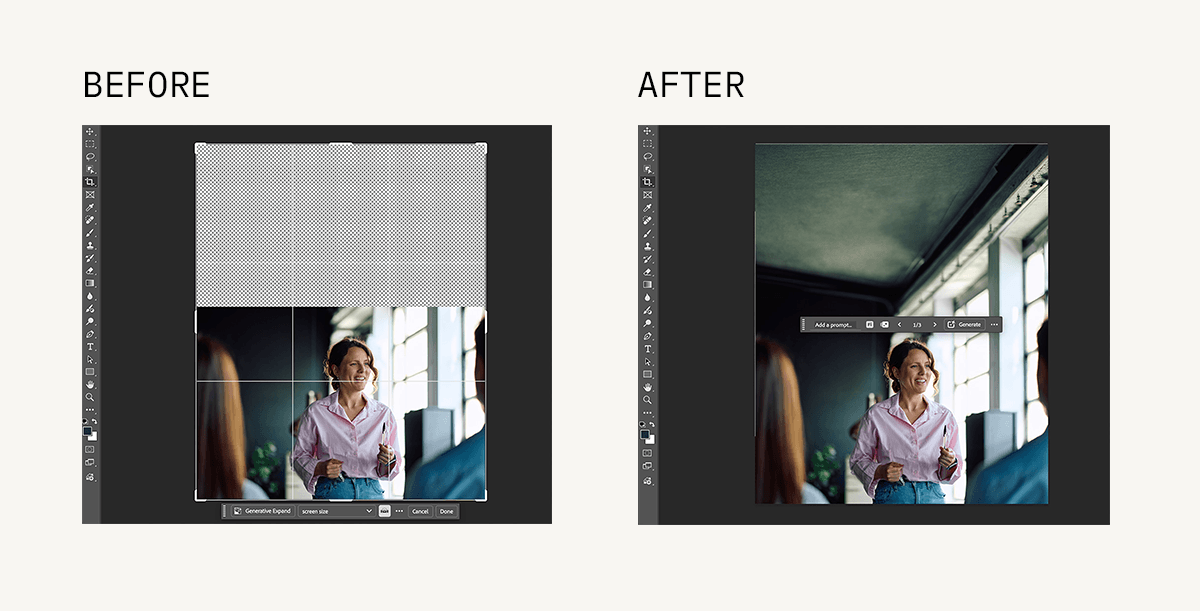
This can be particularly valuable when clients have invested in high-quality original photography. Instead of selecting a less effective photo simply because its dimensions fit the layout, we may be able to make the stronger image work across more applications.
But there’s an important distinction between extending an image and changing its meaning.
Adding more sky, grass, wall, or environmental background is very different from altering a person’s appearance, changing a product, or manufacturing an element that could misrepresent a facility or service.
Knowing where to draw that line is part of designing responsibly with AI.
Create the image we can't find
AI-generated imagery gets a lot of attention, but generating a new image isn’t necessarily our first choice. If a client has strong original photography, we want to use it. And when the right stock image exists, stock photography can still be an efficient and effective solution.
Sometimes, though, the image we need simply doesn’t exist.
A concept may call for a very particular subject, composition, setting, camera angle, or combination of elements that would be difficult to find in a stock library. Producing it through a custom photoshoot may not make sense for the project’s budget, timeline, or intended use. That’s where AI image generation can open up new creative possibilities.
Instead of searching endlessly for an image that’s almost right, we can begin defining what the design actually needs. From there, the process becomes iterative.
We can provide visual references, refine the composition, adjust the environment, change the perspective, and continue generating possibilities until we find a direction worth developing.
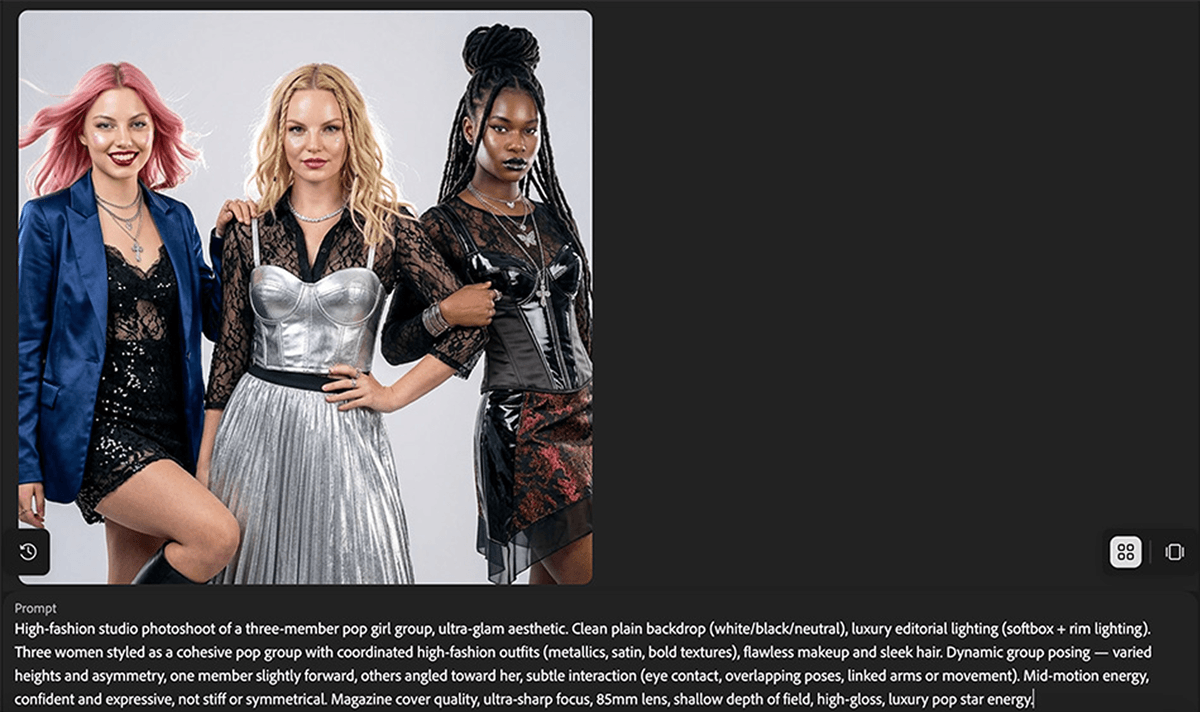
It can also help to have one AI tool write the prompt for another. Describing the concept in plain language to a conversational tool such as ChatGPT, then asking it for an image prompt, can surface the photography terms (lighting, lens, depth of field) that move a generation closer to what the designer has in mind.
Those imperfect attempts are actually an important part of the story.
AI rarely interprets a creative vision perfectly on the first try. It may misunderstand scale, create an awkward pose, add unnecessary objects, or produce something technically polished that simply feels wrong.
That’s where the designer’s role becomes especially important. The finished creative isn’t simply “an AI-generated image.” It’s the result of art direction, experimentation, selection, editing, and design.
The benefit is having another way to create highly specific visual assets when traditional photography or stock can’t reasonably provide them.
Turn a rough idea into a realistic concept
You don’t need a finished visual to have a good idea.
Sometimes a rough sketch is enough to communicate the composition we’re imagining: where a person should be positioned, how the scene should be framed, what should appear in the background, and where the design needs open space.
AI can help bridge the gap between that rough idea and something much easier to visualize.
The sketch doesn’t need to be polished. Its job is to communicate the idea.
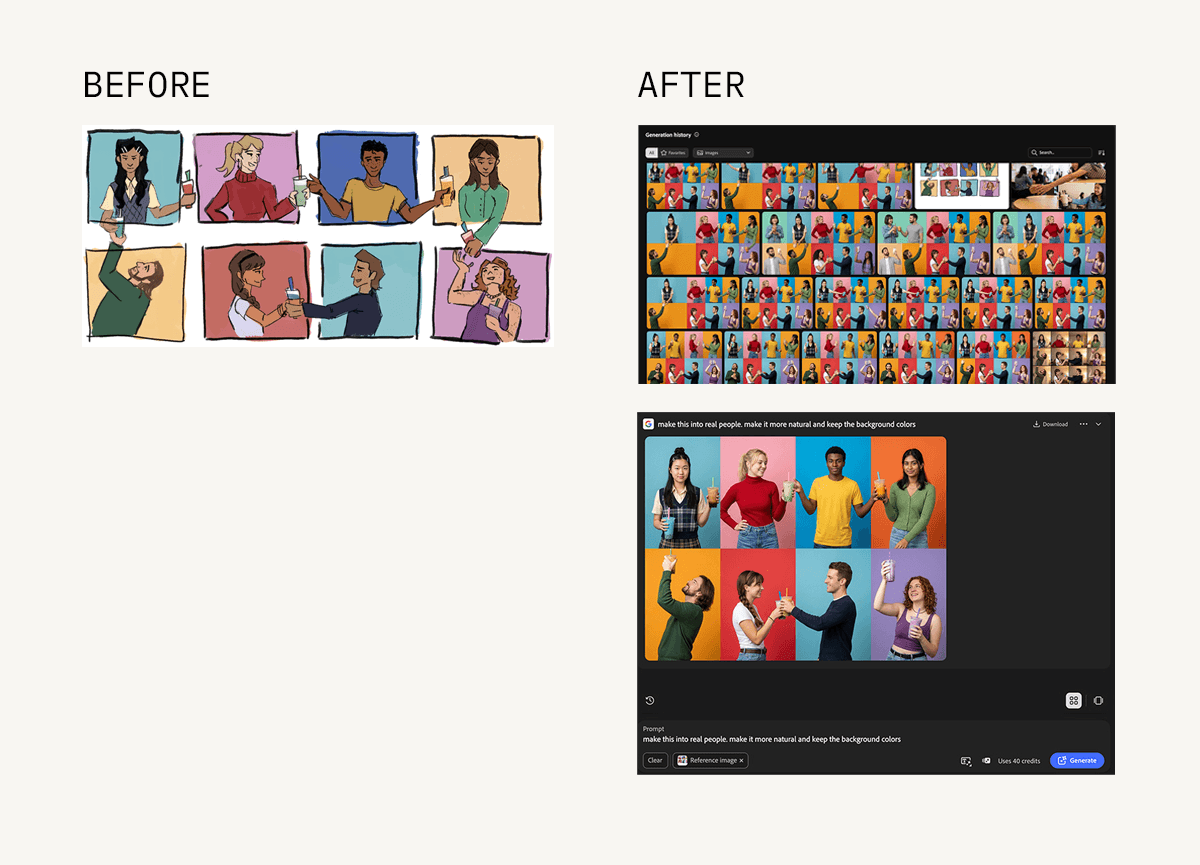
By combining that sketch with written direction and reference imagery, generative AI can begin translating the composition into something more realistic.
Then we refine. Maybe the camera angle isn’t right. The subject needs to move. The environment feels too staged. There isn’t enough negative space. The lighting doesn’t fit the concept. Those decisions become additional direction for the next round.
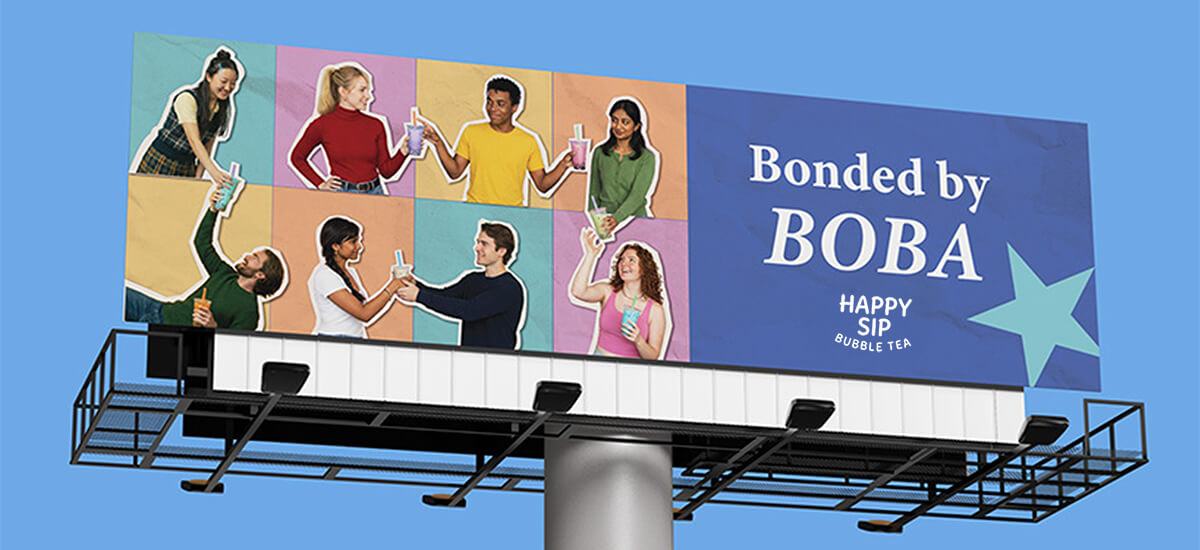
This process can be especially helpful when we’re trying to determine whether an idea is worth pursuing before committing significant resources to executing it.
Instead of relying entirely on a written description, clients and creative teams can react to something tangible.
Does the composition work? Is the concept communicating what we hoped? Should we continue developing it—or go in another direction?
AI can help answer some of those questions earlier. That’s making creative exploration more visible.
Critique, test, and refine the work
One of our favorite ways to use AI has very little to do with generating creative work. We can also ask it to challenge or grade work we’ve already created.
After spending hours thinking through a design, it’s easy for anyone to become familiar with it. A fresh perspective, even an artificial one, can surface questions worth considering.
- For a landing page: What questions might a first-time visitor still have after viewing this page?
- For a website component: What problems could occur when this design adapts from desktop to a small mobile screen?
- For a campaign: What could someone misunderstand about this message if they encountered the ad without any other context?
The most important part comes next: we don’t automatically make every change AI recommends. Some suggestions may identify genuine issues. Some may point to something we’ve already considered. Others may be inappropriate for the strategy or demonstrate that the AI doesn’t understand enough about the project.
That’s exactly why this can be a useful exercise. AI gives us another perspective to consider, not another decision-maker. The creative team still determines which feedback improves the work.
Knowing when not to design with AI matters, too
Using AI thoughtfully also means recognizing when it isn’t the right tool.
There are situations where original photography is more authentic, stock is more efficient, a human illustrator can create something more distinctive, or a traditional design process simply produces a better result.
Accuracy matters, too. We wouldn’t want AI to fabricate something that could misrepresent a client’s people, products, facilities, or services. A generated image that looks realistic can create an entirely different set of concerns than an obviously conceptual illustration.
Copyright and ownership are evolving considerations as well. The U.S. Copyright Office has clarified (pdf) that copyright protection depends on human authorship, which makes the role people play in directing, selecting, and modifying AI-generated material important.
The tools themselves matter, too. For example, Adobe says Firefly is trained on licensed content, such as Adobe Stock, along with public-domain content, which is one reason professional creative teams should understand more than simply what a tool can generate.
For every project, the most useful question is “Should we use AI for this?” It’s not, “Can we use AI for this?”
Better tools still require good creative thinking
AI is changing what’s possible in design, and those capabilities will continue evolving. And, we’re excited about that.
Our team has already seen how AI can help us explore more possibilities, solve tedious production problems, make existing creative assets more useful, visualize ideas faster, and challenge our own thinking.
But better tools don’t automatically produce better creative work.
They still need people who understand the audience, the brand, the business problem, and the purpose behind the design. They need someone to recognize when an idea has potential—and when something that looks impressive isn’t actually the right solution.
That’s ultimately what designing with AI means to us.
Use the technology where it makes the creative process smarter, faster, or more capable. Then apply the human strategy, creativity, and judgment necessary to turn those possibilities into work that actually works.
About this article: This post was developed from initial research and examples by TBH Creative design intern Sarah Aday, with additional insights and real-world examples from the TBH Creative team.
About the author TBH Creative
TBH Creative is an award-winning marketing company specializing in web design/development, digital strategy, inbound marketing, and reporting. Since 2004, we’ve built multi-dimensional digital marketing campaigns and complex, enterprise-level websites for clients in a wide range of industries.
We believe in communicating clearly, delivering excellence, and beating deadlines. But beyond those ideals, what really drives the heart of our business is your business—helping our clients achieve more with comprehensive digital marketing and web design.
Related articles