Can I use AI to build my website? We “interviewed” Claude to find out
“Can I use AI to build my website?” It’s the question currently at the forefront of many business owners’ minds. And the appeal is obvious. Why pay for someone to build it if AI can do it for you?
The short answer to whether or not AI can create your website is: sort of. AI can absolutely produce working web pages quickly. A few prompts, maybe a design reference, and you’ll end up with something functional. But there is a lot more to building a website than what you see in your browser, and that’s exactly where AI can struggle.
But hey, we’re a web design agency, so you might expect us to say that. Instead of asking you to just trust us, we took it right to the source. We had a chat with Claude, one of today’s leading AI assistants, and asked it what AI realistically can and can’t do when it comes to building websites.
The key takeaways, if you’re short on time:
- AI can produce a working first draft of almost anything you ask it to build. It’s great for planning, prototyping, and troubleshooting.
- For simple sites, Claude says that it can take on the majority of the project with minimal human assistance. For enterprise-level sites, Claude’s confidence drops, admitting it’s only useful for a small fraction of the total effort. Essentially, the more complex the project, the less useful AI becomes.
- AI works best as part of a larger process guided by humans with technical expertise.
Keep reading for a full breakdown of our interview with Claude to find out what AI gets right, where it falls short, and where it fits best in a real website project.
An interview with Claude
Why “interview” an AI assistant?
“Vibe coding” has recently exploded in popularity. For those not familiar, vibe coding is essentially AI-assisted web development that lets AI do the majority (or all) of the coding work with minimal review of the output, guided by prompts and feedback. While not limited to non-technical users, it gives people with no coding background a new sense of power to be able to build things themselves.
With that much trust being placed in AI to build projects on the web, we wanted to interview Claude to find out how confident AI really is in its own abilities, as well as:
- To check our own bias. We have a vested interest in the human side of website creation, so getting a different perspective straight from AI helps keep us honest.
- To confirm the limitations. What areas will even the best non-technical vibe coder struggle with when using AI to build websites?
- To help our clients. Determining where AI actually adds value will help us better navigate all of the new tools and opportunities AI brings both for ourselves and for our clients.
What we asked Claude
We asked Claude to reflect honestly on its abilities to design and build a company’s marketing website from start to finish. Here’s the prompt we used, with the goal of trying to get an honest, unbiased assessment.
“Assume a business owner has asked you to design and build their company’s website, from start to finish, with no other help. Consider that the business owner might be a non-technical user. Give an honest, realistic self-assessment grounded in modern website development best practices. Be specific as to what parts of this project you could execute successfully on your own, and which parts would require the assistance of a developer, designer, or agency professional. Explain why in technical terms, avoiding generic or noncommittal answers like “it depends”, and admit when there is nuance in the honest answer. Use examples of real-life scenarios if relevant. Emphasize anything that might surprise someone who believes AI is either fully capable or completely useless for web development.”
Here’s what Claude had to say.
The positives: What does AI do best when building a website?
Claude’s take
Claude’s initial assessment of the skills it believed it could execute well was fairly wide-ranging. Here are some specifics Claude said it could handle well:
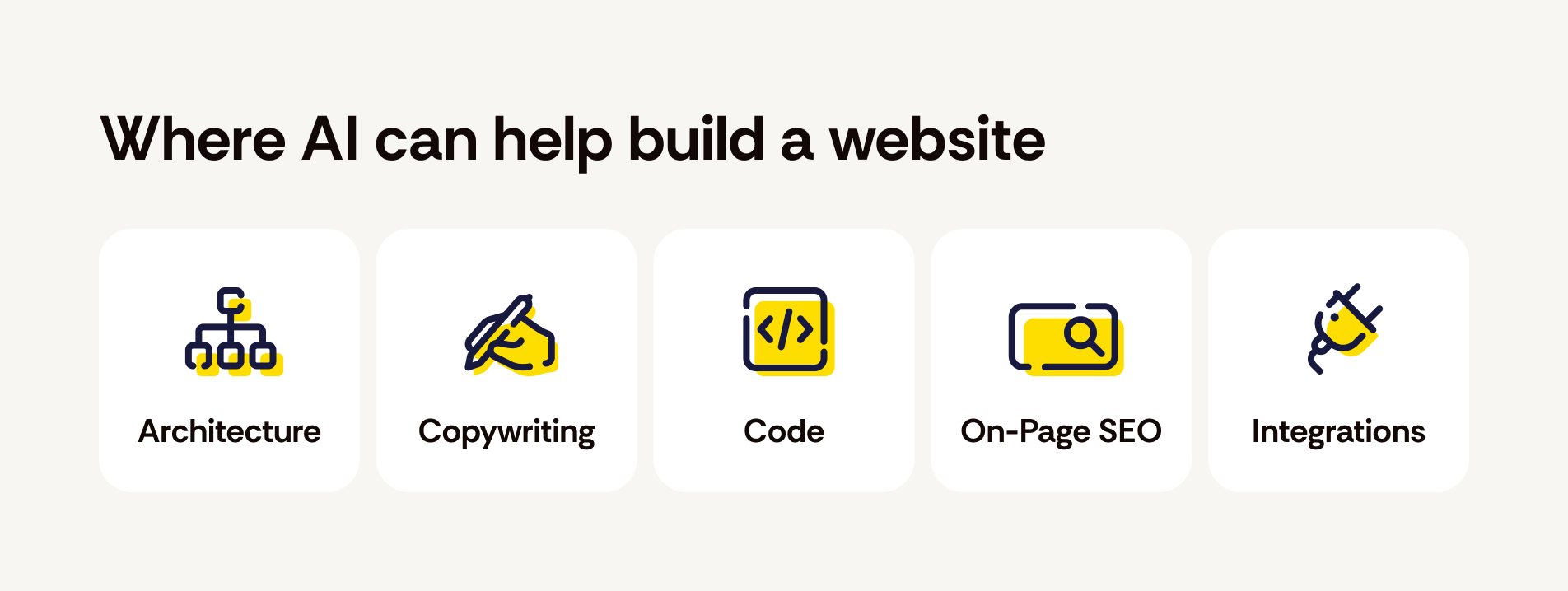
- Site architecture and content strategy. Mapping out pages, navigation, user flows, what content goes where.
- Copywriting. Headlines, service descriptions, About pages, calls to action.
- Frontend code. HTML/CSS/JS, React, responsive layouts, semantic markup, basic accessibility.
- Basic on-page SEO. Meta tags, structured data (schema.org markup), semantic HTML, sensible URL structure, image alt text.
- Standard integrations, at the code level. Wiring up a contact form to send email, embedding a Stripe checkout button, connecting Google Analytics, adding a newsletter signup to Mailchimp.
Claude made some pretty bold claims, such as: “I can write production-quality code here. For a local bakery, salon, law office, consultant, contractor — a straightforward marketing site with a contact form, a few service pages, and an image gallery — I could realistically produce the whole codebase myself.”
However, we felt this initial assessment was lacking detail of some of the more nuanced areas of web development. So, we pushed a bit further to focus on some specifics and asked Claude to further assess its skills when building a production-ready enterprise marketing site with CMS integration, technical SEO requirements, WCAG accessibility compliance, and performance optimization (all important aspects of enterprise-level web development). In this scenario, Claude narrowed down its primary usefulness to the following areas:
- initial code scaffolding
- content schema design
- accessibility-aware component code
- SEO-aware markup
- first-pass performance-conscious build
Our initial reaction
Claude’s confidence in its skills was not overly surprising, as in our experience AI is rarely humble about its abilities. While some of its claims were a bit overzealous, it did provide a solid list of skills that, for the most part, we agreed it could realistically handle well.
When pushed to further refine its skill list for more complex sites, it did narrow it down in a way that felt more honest than we anticipated.
The negatives: Where does AI fall short when building a website?
Claude’s take
Claude’s admission of where it falls short varied greatly between the initial prompt and the follow-up to focus on key areas of web development.
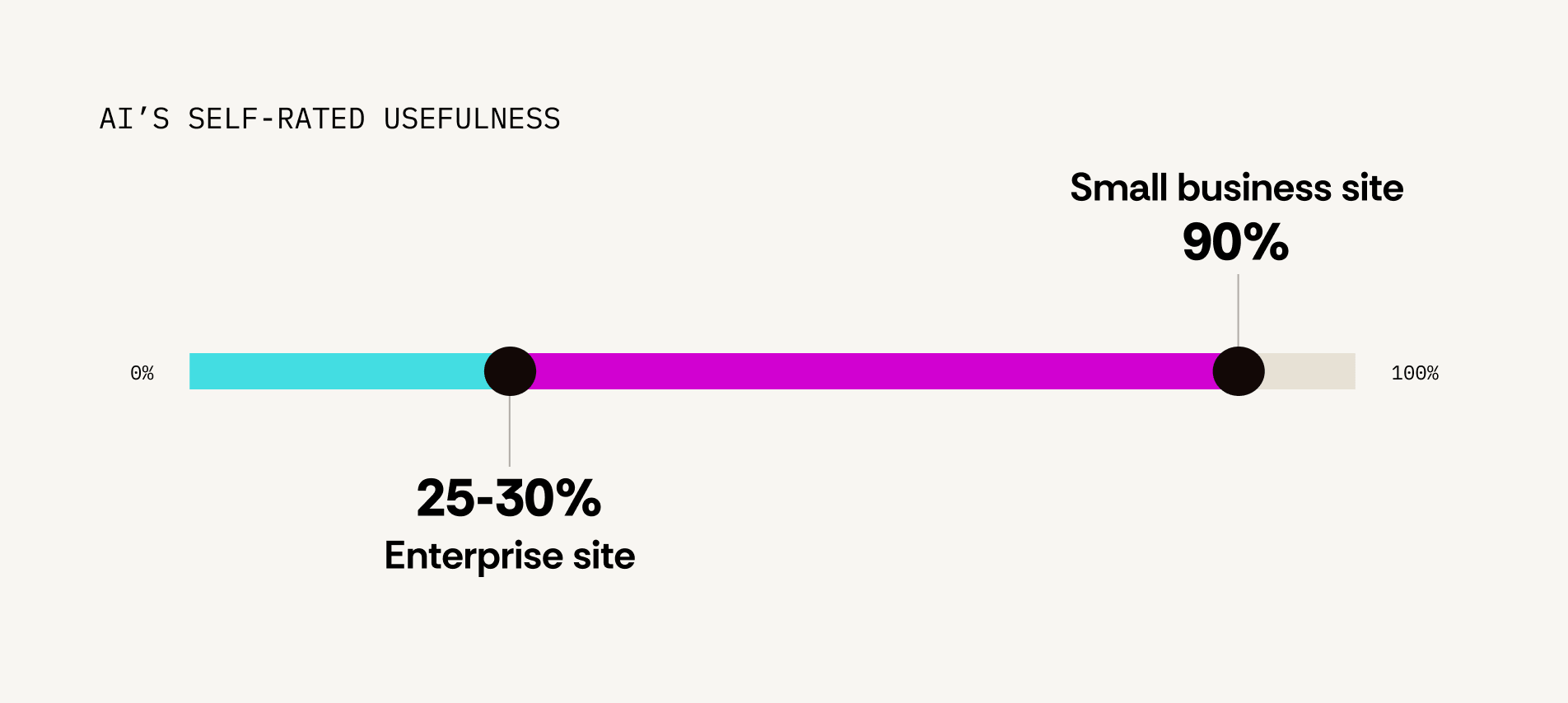
Initially, it confidently assured it could handle a large majority of the work required to build a company’s website, going so far as to say that for most small business websites, “the business owner’s actual remaining task is often just paying for hosting and clicking ‘publish.’” When focusing on an enterprise-level website project, that confidence began to waver, with Claude summarizing, “I’d estimate I’m genuinely useful for maybe 25-30% of total project effort”.
Overall, here are the primary areas that Claude self-identified as needing professional assistance to carry out based on our initial prompt:
- Actually putting the site on the internet.
- Visual design and brand identity, beyond a certain point.
- Anything requiring a running, monitored, evolving system.
- E-commerce and payments at real scale.
- Legal and compliance content.
- Real-device and real-user testing.
Once getting more into the weeds of enterprise-level web design and development, that list grew to include the following:
- content migration and governance
- empirical SEO monitoring and migration execution
- legally-defensible accessibility auditing
- production performance tuning against real telemetry
- enterprise systems integration
- ongoing contractual accountability
Our initial reaction
Claude admitted to more gaps than we initially anticipated, although it did take the extra prompting to surface details on some of the higher-level concepts that need to be considered when building a website.
The self-admitted downfalls covered most of the obvious issues we would anticipate with an AI-generated website. However, Claude kept it fairly high-level. In our experience, it’s often the smaller details that can become the bigger problems.
For example, in one of our tests using AI-generated code, we found that while AI created a functioning product, it didn’t hold up well to scrutiny at the code level. We found issues with code quality, accessibility, mobile layout, and more that made it difficult to update and far from production-ready.
For a client, while all they might see is a functioning product in the browser that looks done, there might be hours or days of work still needed to be able to take a website live. That can be a difficult conversation to have.
The verdict: Can AI successfully build a website?
Now that we’ve seen what Claude has to say, let’s revisit the original question – can I use AI to build my website?
When asked to summarize its assessment, Claude ended with: “I can produce the code and content — a complete, working first draft of almost anything you’d ask a developer to type. What I can’t do is anything that requires a live account, real production data, physical hands-on-keyboard access to a server, or legal/contractual accountability. The gap isn’t about task difficulty — it’s structural: those things require persistence, access, or liability that a stateless assistant doesn’t have.”
We think “first draft” are the key words there. In our real-world experience with using AI to generate code, we’ve found that those first drafts vary greatly in how close they are to a final product. Some code can be quickly cleaned up and moved right into production, while other code is way off base and has to be scrapped entirely.
And this highlights one of the main patterns in our interview with Claude that raises concern. The danger of vibe coding is that AI doesn’t often explicitly tell you what you AREN’T asking. Without a deeper understanding of code or other behind-the-scenes details of creating a website, there could be key steps being left out entirely and you would never know it.
While some of the gripes about AI-generated code are more surface level or subjective, there is serious potential for larger-scale issues (like accessibility errors or security risks) where AI is not necessarily giving you the full picture without specific prompting. Blindly pushing AI-generated code to a production site would be an incredibly risky move.
If you have a small marketing website that is mostly a “set it and forget it” project, using AI to build it might be an okay approach. However, if you’re working on a larger scale project, AI might help to cut out some time and cost during certain aspects of the project, but you are almost guaranteed to need additional professional assistance.
| Project type | AI usefulness |
|---|---|
| Simple small-business site | High |
| Portfolio or personal site | High |
| Content-heavy site with CMS | Moderate |
| E-commerce site | Low |
| Enterprise marketing site | Low |
Where does AI fit in the website creation process?
This interview with Claude shows that if your intention is a production-ready website, AI typically works best as a tool in a larger process where it’s working alongside experienced developers who can help guide it to produce quality results.
However, that doesn’t mean that non-developers should never use AI to build something. Claude’s responses in this interview help to highlight the use cases where AI can successfully assist in the website creation process without a need for professional oversight.
In our experience testing and experimenting with AI for day-to-day tasks, here are the areas where we’ve found it to be the most useful.
Planning & architecture
From site maps to data structure to content outlines, these types of tasks have a variety of benefits when working alongside AI, such as generating ideas, synthesizing information, and more.
Wireframing & design inspiration
AI can help to generate website wireframes and even design ideas to make the initial phases of web design quicker than ever. This can be a great time saver at the beginning of a project.
Prototyping
This is where we’ve found AI can really shine, in that it can quickly create working prototypes for projects or components that let you get into the “how will this work” or “how will this look in the browser” phase faster. It gives you a more efficient way to run through various ideas and iterations of a project before committing to a specific path.
Troubleshooting
Using AI to troubleshoot or debug existing code can sometimes be helpful to point you in the right direction.
Closing thoughts
Overall, it’s understandable that people want to push the limits of AI to see what’s possible and what new avenues can be opened in the web development world. That’s why it’s important that website professionals work with these new tools instead of fighting them in order to find the best path forward for everyone. Finding the right balance when using AI can be a challenge, but it’s an important one that we can all navigate together.
If you need help weighing the pros and cons of using AI for your website or are looking for experienced professionals who can harness the power of AI where it fits best, we’d love to talk.

About the author Kayleigh Circle
Kayleigh is a web developer at TBH Creative, specializing in front-end development. She likes to blog about a variety of web design topics, including design tips, the latest trends in the industry, and how to make your website more successful.