A developer’s guide to website design reviews: Tips and a comprehensive checklist
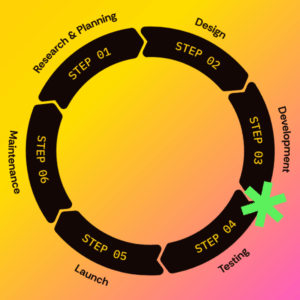
Website design reviews are an essential step in any new website build or redesign. Their purpose is to gather and prioritize any design feedback needed before moving on to the development phase. The process typically involves core team members or stakeholders reviewing high-fidelity designs, either as static mockups or interactive prototypes.
While the review process can vary by company or project type, one thing remains true: excluding web developers from website design reviews can be a costly mistake.
Designer-developer collaboration from the start of a project helps ensure technical feasibility and lays the foundation for successfully bringing a designer’s vision to life. Developers are ultimately responsible for turning high-fidelity designs into a functioning website, so getting their input early on can help avoid scope creep, usability issues, or time-consuming rework down the line.
In this article, we’ll take a closer look at why web developers need to understand how to review a website design and the common issues they help catch. You’ll also find a comprehensive design review checklist and tips for web developers on how to give better website design feedback.
Common issues web developers catch during website design reviews
Website design reviews aren’t just about getting the visuals right – they’re a chance to identify potential roadblocks or issues that might arise during development and beyond. Most problems are far easier to address during the design phase than once designs are committed to code.
When a developer reviews a website design, they bring a broader technical perspective to the process. They’re thinking through how components will be built, how users will interact with the website, and how the design will adapt to real content and devices. Reviewing a design through this lens helps uncover design feedback that others might miss.
Some common issues developers catch are:
- Styling problems. Things like misaligned elements, uneven padding, or inconsistent color values often become more noticeable during a technical website design review.
- Design inconsistency across pages or components. Because most websites rely on reusable patterns and components, developers focus on the big picture and can help spot when similar elements look or function differently between page designs.
- Incomplete or missing functionality. Thinking through how complex features will work in practice helps reveal the gaps in a design, such as missing empty states, hover interactions, or other required views for planned functionality.
- User experience concerns. Developers often notice misleading UI elements, unclear click areas, confusing navigation patterns, or other unintuitive interactions based on the logic required to build them.
- Accessibility issues. If a project aims to meet specific accessibility standards, such as WCAG, developers can flag design patterns that might introduce barriers or fail to comply when implemented.
8 key areas to evaluate during a website design technical review
Here is a checklist for web developers covering what to check during a technical website design review. Each section includes the primary question to answer, specific items to check, and a bonus tip for designers to support the development process better.
Visual consistency
Are global elements and reusable components clearly defined? Styles and design patterns should maintain consistency across designs.
- Verify consistency in styles such as colors, typography, iconography, spacing, grid usage, padding, or margin.
- Confirm that any custom fonts are appropriately licensed for web use.
- Check that components and design patterns behave consistently across pages or artboards, and that any exceptions are intentional and follow clear logic.
- If you’ll be using a design system, confirm that design tokens and other system elements are properly defined or applied.
Design tip: Most modern design programs have features to help with design consistency and style reuse. For example, Figma offers variables, styles, and components to help manage global elements.
User experience (UX)
Are functional areas and interactive elements fully defined and intuitive? Offer UX feedback on overall flow, navigation, and interactions.
- Confirm all required element states are provided (e.g., hover, active, focus, selected).
- Check that animations, transitions, or other movements are defined, practical, and within scope.
- Review for any error states, empty states, or other edge-case scenarios that aren’t defined.
- Verify that interactive elements align with user expectations (e.g., buttons look clickable, links are distinguishable).
- Confirm that navigation elements are intuitive and feasible given any platform’s limitations.
Design tip: For complex interactions and animation, providing examples from live websites or sharing a working prototype can help clarify expected behavior to the development team.
Responsive design
Is it clear how the design should adapt to different screen sizes? Confirm you have enough design direction to maintain design integrity across all breakpoints.
- Verify that designs are provided for all necessary breakpoints as needed
- Confirm that layouts have a clear stacking order for smaller screens
- Identify any questions about how a layout or component should resize between breakpoints
- Ensure any alternate mobile options are supplied for components that don’t scale down well (e.g., tables, navigation, tabs)
- Check for proper focal point placement for any images that will need to be cropped or resized at different screen sizes
Design tip: Confirm early on with the development team what sizes to use for design files and expectations on how elements should scale.
Accessibility
Can all design elements be built in an accessible way? Review against the necessary accessibility standards to flag compliance issues or usability barriers. (For this checklist, it’s assumed that WCAG compliance is the target; this is not an exhaustive list of requirements, but an overview of the most common accessibility issues found during website design reviews.)
- Check that color combinations have proper contrast ratios (including hover and focus states).
- Identify potential barriers for keyboard-only users or assistive technologies such as screen readers.
- Ensure forms follow accessibility best practices.
- Check for instances of text embedded in images where regular text would work instead.
- Look out for content issues such as incorrect heading levels or ambiguous links (e.g., “read more”).
- Confirm that auto-playing videos or animations provide a way to stop or disable them.
Design tip: A working knowledge of WCAG criteria and accessibility best practices is beneficial for designers to avoid introducing accessibility issues and helps streamline this step of the website design review process.
Performance
Do the designs support any project performance goals? Compare against best practices and identify any problematic design patterns that could negatively impact loading times.
- Confirm that any libraries, plugins, or frameworks required to build the designs fit within the performance budget.
- Review media-heavy pages and flag any loading concerns (e.g., reducing the number of images or adding pagination).
- Consider whether any proposed animations or interactions will negatively impact page performance.
- Check that the number of fonts or font weights used is reasonable for performance (if loading in custom fonts).
- Verify that images, videos, or other assets are correctly sized and optimized (or that a plan exists to optimize before handoff).
Design tip: Performance optimization starts at the design level. Elements like images, fonts, and animations all impact how a website loads. Check with your development team before starting designs to align on guidelines and avoid rework later.
Technical feasibility
Can everything be built as designed? Compare against defined technical specifications and any platform limitations. Be on the lookout for anything that doesn’t seem feasible.
- Evaluate whether the project timeline and budget support the level of effort required to build the designs.
- Flag anything that isn’t accounted for in the development plan or may unintentionally add scope to the project.
- Check that any conditional logic or dynamic content views are clearly defined (e.g., filtered views, sorting options, personalization).
- Confirm third-party elements (e.g., form embeds, plugin-based features, embedded videos) are represented accurately.
- Ensure any required system-generated elements are addressed (e.g., search results, error pages, dynamic listings).
Design tip: Gaining a basic familiarity with the tools that power a website can help web designers make more informed design choices.
Content editing and scalability
Do the designs support content editing and future growth? Particularly if your website uses a content management system (CMS), it’s vital to ensure page layouts accommodate the intended editing experience.
- Check that the designs align with the planned data structure (e.g., content types, fields, taxonomies).
- Verify that reusable templates and components are used consistently to allow for proper modularization.
- Consider the technical skill level of future content editors and whether anything needs simplifying.
- Identify areas that may require hard-coded content and evaluate the trade-offs.
- Review flexible content areas to ensure adding or removing content won’t break the layout.
- Confirm that components and design patterns allow flexibility in creating new pages or templates as needed.
Design tip: When designing elements for a CMS-based website, always ask “what will happen if more or less content is added here?” This will keep you in the right mindset for designing a flexible, scalable website.
5 best practices for web developers to follow as part of technical website design reviews
A checklist works best when there’s a solid process behind it. Before you begin, keep these best practices in mind to get the most out of your website design review.
Choose the right team to review
A technical design review requires a skilled web developer who can accurately identify the items in the checklist. Typically, this will be a more senior-level team member with the development experience and attention to detail required to give effective design feedback.
Tailor the checklist to your project
Every website project has its own needs and goals. While some checklist items are universal, others will need to be customized to your project’s specific requirements. For example, a web application design review may prioritize functionality and UX feedback, while a marketing website design review may focus more on layout and visual consistency.
Define tech specs ahead of time
Giving meaningful technical design feedback is difficult without a clear development plan to review against. To minimize guesswork, start outlining technical specifications ahead of the design phase. Having details such as functional requirements, data structures, and editing requirements in advance will make the development team’s review more beneficial.
Establish a process for sharing feedback
Even the best design feedback can lose its value if it’s not communicated properly. Before starting a website design review, define requirements for how feedback should be documented, prioritized, and implemented. Getting everyone on the same page early on will help manage expectations and reduce friction.
Use the right tools
Modern design tools offer features that make reviewing and giving feedback more efficient. For example, if your team uses Figma, the Dev Mode feature is a helpful way to inspect technical details such as spacing and design tokens. Many design programs also offer plugins to make it easier to review aspects such as accessibility or component usage. Beyond design programs, there are a variety of tools and apps that can streamline feedback management and collaboration, such as project management platforms and file-sharing services. Experiment with different options to find the combination that best supports your workflow and project needs.
Tips for web developers on how to give better design feedback
Understanding how to review a website design is only part of the process. Knowing how to provide designers with effective, actionable feedback is equally important. While every team works a little differently, there are some reliable best practices developers can follow to improve the website design review process.
- Use visuals to clarify feedback. Screenshots, annotations, or even live code examples can be helpful when giving technical notes.
- Avoid unnecessary developer jargon. Not all designers are familiar with development terminology, so keep feedback as straightforward as possible unless technical detail is genuinely needed.
- Prioritize feedback. Depending on your project timeline, you may need to organize feedback into priority levels. Designers won’t always know which issues are quick development fixes versus those that require more complex rework, so developers should help prioritize when needed. Just be sure to document any non-critical feedback that doesn’t make it into the final designs.
- Encourage collaboration. Maintain clear communication between design and development throughout the review process. Be open to walking through your feedback or answering designer questions. This strengthens team relationships and ensures a smoother transition into the development phase.
Following these tips and using the checklist as a guide will lead to a more effective website design review process. Involving developers early and clearly communicating feedback helps improve design quality and prevents costly rework. A thorough technical review builds confidence going into the development phase and supports overall project success.

About the author Kayleigh Circle
Kayleigh is a web developer at TBH Creative, specializing in front-end development. She likes to blog about a variety of web design topics, including design tips, the latest trends in the industry, and how to make your website more successful.